New Functionality
Block Leave Periods
Specify periods during which employees are not allowed to take leave. This is useful, for example, during peak seasons. Access to this option can be controlled through the authorisation profile, and the periods can be managed from the Full User client.
Menu: Leave & Absence > Organization > Block leave periods
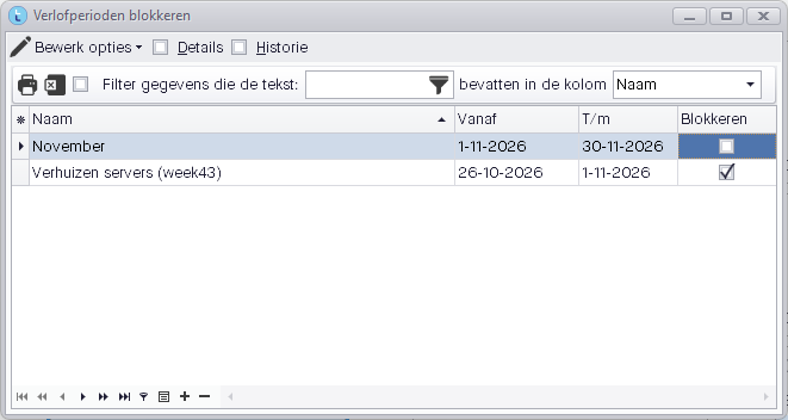
- Multiple periods can be added.
- A period can trigger either a blocking message or a warning only.
- Blocks can be linked to specific organisational units, allowing you to fine-tune which employees the restriction applies to.
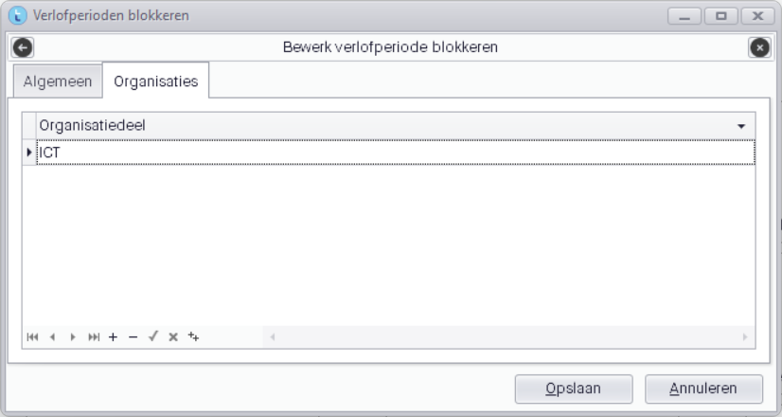
Note: This notification is currently displayed when leave is requested. At a later stage, this check will also be added to the leave approval process.
Set Up "Is a replacement for"
It is now possible to configure “Is a replacement for” directly from the Full User client.
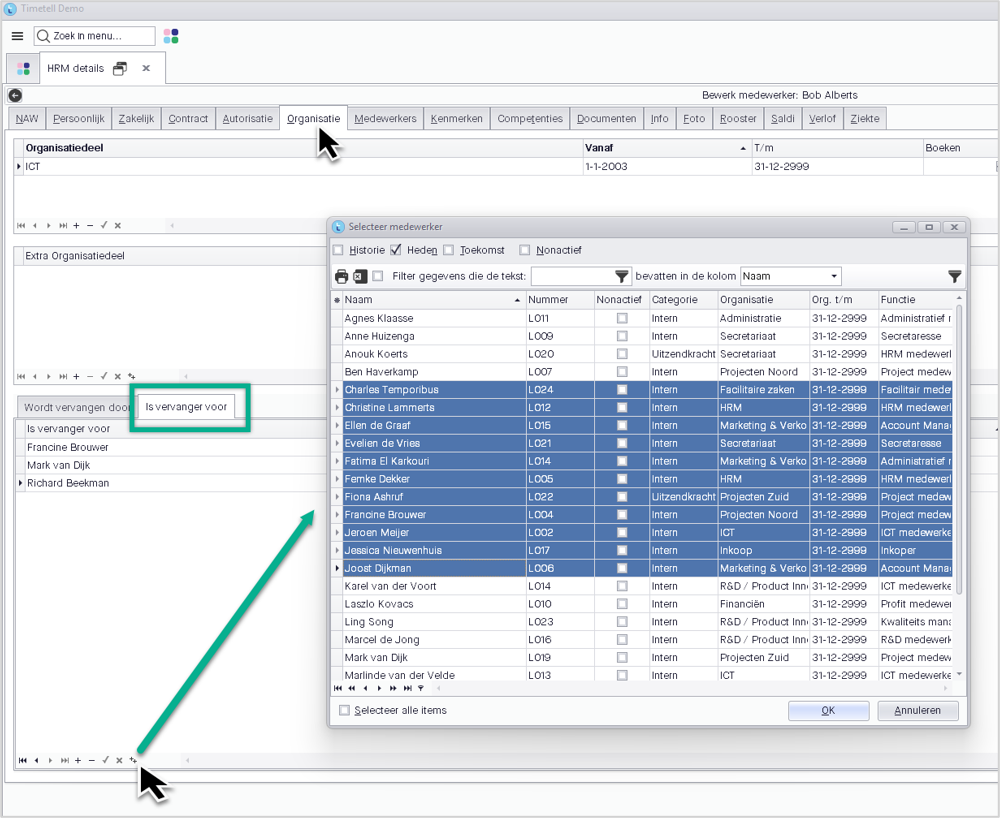
Menu: Personnel > Organization > HRM Details – Organisation tab
At the bottom of the tab, you can assign employees under “Is a replacement for”.
Previously, you had to open an employee's record and assign a replacement there. You can now configure this from the record of the person who will be replacing other employees.
You can also use ++ to add multiple employees for whom the person is authorised to act as a replacement.
Faster Leave Approval
Separate tasks are now available for processing leave and sickness.
These tasks can be used to speed up leave approval.
After the update, the interval for the leave task can be set to 15 minutes. In the configuration profiles, you can then configure the “Scheduler processes leave after approval” option under Leave.
When approving leave requests, you no longer need to wait for the leave to be posted to the timesheets. The scheduler will process this in the background.
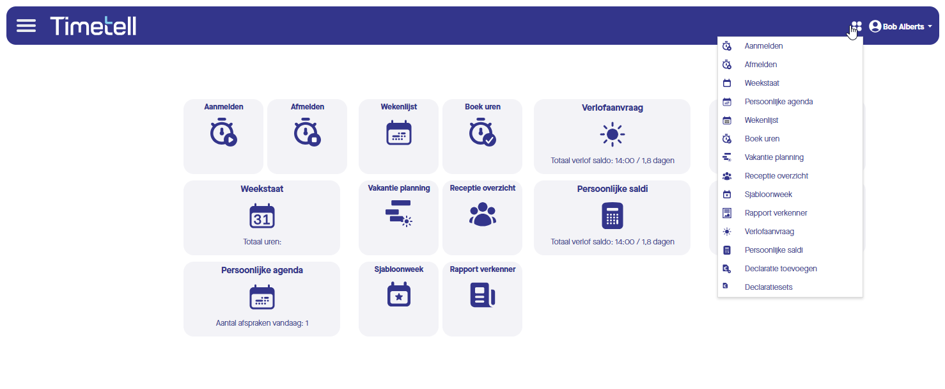
Favourites Menu in the Web Client
The tiles are now also available from the menu bar in the web client. This makes these options accessible from any screen and, for example, allows users to clock in or out quickly while keeping another screen open.
Improvements
Full User Client
- You can now add a tile directly from the menu search results by right-clicking.
- The filter dropdown in reports now only displays values from items that have already been filtered.
- Optionally, you can now record the serial number directly on the clock pass.
- Added an option to have “Show all weeks” checked by default in the configuration profile.
- Added OAuth 2.0 support for AFAS integrations.
- Added multi-select copy and paste using Alt+Shift+C and Alt+Shift+V in timesheets and planning.
Bug Fixes
- Completing entries up to the scheduled hours could result in more hours being booked than scheduled.
- Updating the selection table could fail when references were incorrect.
- The employee popup in the organisation view displayed the same employee multiple times.
- The employee list sometimes incorrectly displayed historical records.
- Login name and claim validation is no longer performed for inactive accounts.
- Overlapping schedules are now reported as errors in the scheduler log.
- The selection was retained when approving leave requests, even after selecting a different request.
- Newly added project managers were not immediately visible in the list.
- Fixed issues with the competency filter in the planning board after selecting an employee.
- The dashboard displayed hidden folders from the report designer.
- The calendar could become unresponsive when displaying a scheduled shift appointment lasting more than 24 hours.
- Fixed a notification about a closed period when creating a week with additional days retrieved.
- Fixed an error when displaying actual figures in the budget.
- Added a warning when too much data is accidentally retrieved in a report or integration.
Web Client
- Added sorting by employee and date when approving projects.
- The reason for rejecting a timesheet week is now displayed next to the status, including when it is approved again.
- Improved the display of balances and the approval screen.
- Time is now updated automatically when booking hours.
- Breaks are now displayed in the reception list.
Bug Fixes
- Pivot tables now sort correctly by date value.
- The incident report now displays all columns when using a restricted list.
- Hours are now also displayed in red in the timesheet when only the end time has been entered.
- Fixed incorrect route calculation for mileage claims involving toll roads.
- Filling a timesheet from a budget now also works without the planning module.
- Daily Processing
- Daily Processing did not save the active cell.
- Daily Processing did not save the approval status when selecting the option to apply through Saturday.
- Refreshing Daily Processing did not work when using the Refresh button.
- The daily calculation popup displayed too many rows.
- Information about chronological booking disappeared when approving through Daily Processing.
Was this article helpful?
That’s Great!
Thank you for your feedback
Sorry! We couldn't be helpful
Thank you for your feedback
Feedback sent
We appreciate your effort and will try to fix the article